As a substantial change in the new architecture of deegree, the Capabilities document functions as a central configuration document. For this purpose, compared to the specification of the OGC, tags were added, which are needed only by the deegree WFS and which are not returned in the request of the Capabilities using the GetCapabilities Requests. For further general references of the creation of a WFS Capabilities document please refer to WFS specifications.
In two locations, new tags were added to the WFS capabilities document, which allows deegree WFS, to delegate competencies for data-access and the event-handling to the responsible Java-classes. This approach makes it possible for the user, to write and use his own access-classes for not yet supported data sources (e. g. Map-Info files), without the need to compile the whole WFS.
For each output-format, known to the WFS, an own Handler is available, which - if necessary - executes completing formattings to the result of a GetFeature request, before it is delivered to the client. These work globally on all FeatureTypes. As standard, three output-formats are known by the WFS. Beneath the mandatory-defined GML2 these are XML (not necessary GML-conformant) and FEATURECOLLECTION. The last one refers to serialized (Java) deegree-FeatureCollections, which can be used when the WFS-client is built with the deegree-framework too.
The element:
WFS_Capabilities/Capability/Request/GetFeature/ResultFormat
of the capabilties-document contains the output-formats, which are known to the WFS. The WFS-specifications specify GML2 as the only result-format, which is defined as an empty element. As described above, deegree enhances the possible elements and adds the attribute "className". This declares, which java-class is responsible for the concluding formatting of the provided result. A valid entry in the capabilities-document for all of the deegree-supported formats looks like the following:
...
<GetFeature>
   <ResultFormat>
      <XML className="org.deegree_impl.services.wfs.XMLResponseHandler"/>
      <GML2 className="org.deegree_impl.services.wfs.GMLResponseHandler"/>
      <FEATURECOLLECTION className="org.deegree_impl.services.wfs.FCResponseHandler"/>
   </ResultFormat>
   <DCPType>
      <HTTP>
         <Post onlineResource="http://121.0.0.1:8080/deegreewfs/wfs"/>
      </HTTP>
   </DCPType>
</GetFeature>
...
A valid responseHandler for the output-format must implement the interface org.deegree.services.wfs.GetFeatureResponseHandler
Another section of the WFS-document deals with the Listing of the FeatureTypes (WFS Capabilities/FeatureTypeList) known to the WFS. For each FeatureType, a <FeatureType> element is created according to the WFS-specification. A FeatureType normally conforms to a table (or several linked tables) in a database, a shapefile or something similar.
Besides the sub-elements, as they are described in the WFS-specification, each FeatureType-element contains an additional sub-element <ResponsibleClass>. This provides information about its attribute "class name", which provides the name of the java-class which is responsible for access to the database supplying this FeatureType.
In the context of deegree, this classes are termed "Datastores" and they must implement the Interface org.deegree.services.wfs.DataStore. With the attribute "configURL", a document is allocated to each Datastore, which includes detailed declarations for the connection to the data-source enclosed in the Datastore. E.g. this is an address of a database, the username or the password for the login, etc. A more exact description of the configuration-files for the data-sources is found in the chapter "Data-connection".
The following excerpt of a capabilities-document shows the registering of two FeatureTypes, of which the first one is supplied by an Oracle-database and the second one by ESRI-shapefiles.
...
<FeatureTypeList>
   <Operations>
      <Query/>
   </Operations>
   <FeatureType>
      <ResponsibleClass
         className="org.deegree_impl.services.wfs.oracle.OracleDataStore"
         configURL="file:///$deegreewfs_home/xml/oracle.xml"/>
      <Name>Andreas.GP010100</Name>
      <Title>This is a title</Title>
      <Abstract>This is an Abstract</Abstract>
      <SRS>EPSG:4326</SRS>
      <LatLonBoundingBox minx="-180" miny="-90" maxx="180" maxy="90"/>
   </FeatureType>
   <FeatureType>
      <Operations>
         <Query/>
      </Operations>
      <ResponsibleClass
         className="org.deegree_impl.services.wfs.shape.ShapeDataStore"
         configURL="file:///$deegreewfs_home/xml/sample_shape_config.xml"/>
      <Name>mjrivers</Name>
      <SRS>EPSG:4326</SRS>
      <LatLonBoundingBox minx="-180" miny="-90" maxx="180" maxy="90"/>
   </FeatureType>
</FeatureTypeList>
...
The following table shows, which Datastore (Java-class) is responsible for which data-source and which must be declared on registering an according FeatureType in the capabilities-document:
Table 5. deegrees responsible Java-classes for the data-stores
| data source | Datastore (Java-class) |
|---|---|
| ESRI Shapefiles | org.deegree_impl.services.wfs.shape.ShapeDataStore |
| Oracle Spatial | org.deegree_impl.services.wfs.oracle.OracleDataStore |
| conventional database with point-geometries | org.deegree_impl.services.wfs.db.PointDBDataStore |
| conventional database with point-geometries | org.deegree_impl.services.wfs.gml.GMLDBDataStore |
In the following, the structure and the content of the configuration-files, which are needed to connect to the data-sources, which are known to the deegree WFS, are illustrated. These are the configuration-documents, to which the element ../FeatureType/ResponsibleClass refers.
Deegree WFS possesses an interface (Datastore) for the access to Oracle databases with Spatial Extension (8.1.6 and higher) and uses their access-mechanisms for querying. For using them in an efficient way, all data should be provided with a spatial index.
The design of the configuration-files is in most parts identical to the ones used for accessing conventional databases. Therefore, the configuration described here is exemplary to any of the other datasources.
The configuration is organized simply in three sections. The first section contains information about the connection to a database. The second section describes the return-formats, which are handled by a Datastore. The third section specifies the (database-) schema of one ore more FeatureTypes, supplied by a Datastore.
For the connection-establishment, deegree, respectively JDBC requires information about the drivers, which are to be used and the user, which would like to open the connection. Normally a password is required as well. In addition, the driver requires the information, which version of the Spatial extension is used. The according section in the configuration-file looks like the following:
<Connection name="oracle spatial">
   <driver>oracle.jdbc.driver.OracleDriver</driver>
   <logon>jdbc:oracle:thin:@127.0.0.1:1521:latlon</logon>
   <user>user</user>
   <password>passwort</password>
   <spatialversion>8.1.6</spatialversion>
</Connection>
The attribute "name" is supplied for general information und is not yet analysed. With the <driver> element the server is informed, which JDBC driver is needed for the connection-establishment (in this case a Class 4 driver). <logon> specifies the driver-type and address that is used to connect to the database, and the instance, of the database. If the preset Class 4 driver is used, just address, port and instance have to be adjusted.
The <user> and <password> elements are self-explanatory. However, if no password is needed for the connection, the element is still required. With the element <spatialversion> the version of the Spatial Extension integrated in the database is communicated to the driver. This version-number does not have to be equal to the version of the Oracle Database!
The configuration file contains references to the responsibilities and exact formats of the results from a GetFeature request. These apply to each accessible FeatureType, described by the configuration-file of a Datastore. For each known output-format, the WFS can handle and the Datastore serves, the configuration-document must contain an entry.
Thus, it is stated which class is responsible for formatting the results. In the case of an oracle database there are the three classes mentioned. If new output formats are implemented by the user, a corresponding class has to be created and declared for each of these formats in the configuration document in the datastore. The classes have to implement the interface org.deegree.services.wfs.DataStoreOutputFormat.
When declared in this manner the response schema is defined by the database schema in the case of GML 2 or XML output. The user has the possibility to exchange the data model by one of his own. For this reason, in the <GML2 ...> and <XML ...> elements it is possible to define a filter initiating and describing the re-formatting.
...
<OutputFormat>
   <GML2 responsibleClass="org.deegree_impl.services.wfs.oracle.DataStoreOutputGML">
      <Param name="FILTER" value="file:///$deegreewfs_home/xml/myGMLModel.xsl"/>
      <!-- URL where an application can find the schema of the feature type -->
      <SchemaLocation>file:///$deegreewfs_home/xml/myGMLSchema.xsd
   </GML2>
   <XML responsibleClass="org.deegree_impl.services.wfs.oracle.DataStoreOutputXML">
      <Param name="FILTER" value="file:///$deegreewfs_home/xml/myXMLModel.xsl"/>
      <!-- URL where an application can find the schema of the feature type -->
      <SchemaLocation>file:///$deegreewfs_home/xml/myXMLSchema.xsd
   </XML>
   <FEATURECOLLECTION
   responsibleClass="org.deegree_impl.services.wfs.oracle.DataStoreOutputFC">
   <!-- URL where an application can find the schema of the feature type -->
      <SchemaLocation>file:///$deegreewfs_home/xml/myFCSchema.xsd
   </FEATURECOLLECTION>
</OutputFormat>
...
Within the <GML2> respectively <XML> elements a parameter (element) is defined whereas the name of the parameter (name) FILTER and its value are links to the XSLT stylesheet generating the requested data model by transforming the input schema. Attention should be paid to the case that the data schema transformed by a filter (XLST stylesheet) has to be conformant to the OGC GML 2.1.1 specification if GML 2 is the declared output format. Due to the fact that the FEATURECOLLECTION is binary coded there is no filter provided at the time. Additionaly a XML schema is defined for each output format describing its structure.
As mentioned above, deegree WFS is able not only to handle FeatureTypes based on a "flat" table. As a basic principle any complex schema is addressable represented as 1:1, 1:n and m:n relations between tables. For the WFS being able to resolve the relations, it has to be informed about them within the configuration file of a datastore for each of the FeatureTypes the datastore it is responsible for.
The following example shows the structure of the schema description of a Datastore:
<?xml version="1.0" encoding="iso-8859-1" standalone="no"?>

<DatastoreConfiguration name="iso19115" type="GMLDB">
  <Connection name="iso19119">
    <driver>oracle.jdbc.driver.OracleDriver</driver>
    <logon>jdbc:oracle:thin:@131.220.106.104:1521:latlon2</logon>
    <user>aUser</user>
    <password>aPassword</password>
  </Connection>

  <FeatureType name="ISO19119">
    <OutputFormat>
      <GML2 responsibleClass="org.deegree_impl.services.wfs.gml.GMLDBDataStoreOutputGML">
      <SchemaLocation>
         file:///$deegreewfs_home/xml/iso19119GDIFull.xsd
      </SchemaLocation>
      </GML2>
      <XML responsibleClass="org.deegree_impl.services.wfs.gml.GMLDBDataStoreOutputXML">
      <Param name="FILTER"
         value="file:///$deegreewfs_home/xml/ISO19115.xsl"/>
      <SchemaLocation>
         file:///$deegreewfs_home/xml/iso19119GDIFull.xsd
      </SchemaLocation>
      </XML>
    </OutputFormat>

    <MappingField>
      <Property name="test" type="DOUBLE"></Property>
      <DatastoreField name="Andreas.ISO19119.test" type="DOUBLE"></DatastoreField>
    </MappingField>
    <MappingField>
      <Property name="idMd" type="VARCHAR"></Property>
      <DatastoreField name="Andreas.ISO19119.idMd" type="VARCHAR"></DatastoreField>
    </MappingField>
    <MappingField>
      <Property name="ServiceType" type="VARCHAR"></Property>
      <DatastoreField name="Andreas.ISO19119.ServiceType" type="VARCHAR"/>
    </MappingField>
    <MappingField>
      <Property name="ServiceTypeVersion" type="VARCHAR"></Property>
      <DatastoreField name="Andreas.ISO19119.ServiceTypeVersion" type="VARCHAR"/>
    </MappingField>
    <MappingField>
      <Property name="DataCoupling" type="VARCHAR"></Property>
      <DatastoreField name="Andreas.ISO19119.DataCoupling" type="VARCHAR"/>
    </MappingField>
    <MappingField>
      <Property name="geographicBox" type="VARCHAR"></Property>
      <DatastoreField name="Andreas.ISO19119.geographicBox" type="VARCHAR"/>
    </MappingField>
    <MappingField>
      <Property name="Title" type="VARCHAR"></Property>
      <DatastoreField name="Andreas.ISO19119.Title" type="VARCHAR"/>
    </MappingField>
    <MappingField>
      <Property name="Abstract" type="VARCHAR"></Property>
      <DatastoreField name="Andreas.ISO19119.Abstract" type="VARCHAR"/>
    </MappingField>
    <MappingField>
      <Property name="creationDate" type="DATE"></Property>
      <DatastoreField name="Andreas.ISO19119.creationDate" type="DATE"/>
    </MappingField>
    <MappingField>
      <Property name="revisionDate" type="DATE"></Property>
      <DatastoreField name="Andreas.ISO19119.revisionDate" type="DATE"/>
    </MappingField>
    <MappingField>
      <Property name="IsoDocUrl" type="DATE"></Property>
      <DatastoreField name="Andreas.ISO19119.IsoDocUrl" type="DATE"/>
    </MappingField>
    <MappingField>
      <Property name="ISO19119Full" type="VARCHAR"></Property>
      <DatastoreField name="Andreas.ISO19119.ISO19119Full" type="VARCHAR"/>
    </MappingField>
    <MappingField>
      <Property name="FKKewords" type="INTEGER"></Property>
      <DatastoreField name="Andreas.ISO19119.FKKewords" type="INTEGER"/>
    </MappingField>
    <MappingField>
      <Property name="FKOrgName" type="INTEGER"></Property>
      <DatastoreField name="Andreas.ISO19119.FKOrgName" type="INTEGER"/>
    </MappingField>
    <MappingField>
      <Property name="keyword" type="VARCHAR"></Property>
      <DatastoreField name="Andreas.ISO19119Keywords.name" type="VARCHAR"/>
    </MappingField>
    <MappingField>
      <Property name="thesaurus" type="VARCHAR"></Property>
      <DatastoreField name="Andreas.ISO19119Keywords.thesaurus" type="VARCHAR"/>
    </MappingField>
    <MappingField>
      <Property name="organisationName" type="VARCHAR"></Property>
      <DatastoreField name="Andreas.ISO19119OrgName.name" type="VARCHAR"/>
    </MappingField>
    <MappingField>
      <Property name="FKGeoDesc" type="INTEGER"></Property>
      <DatastoreField name="Andreas.ISO19115.FKGeoDesc" type="INTEGER"/>
    </MappingField>
    <MappingField>
      <Property name="code" type="VARCHAR"></Property>
      <DatastoreField name="Andreas.ISO19115GeogrDesc.name" type="VARCHAR"/>
    </MappingField>
    <MappingField>
      <Property name="/ISO19115/idMD" type="VARCHAR"></Property>
      <DatastoreField name="Andreas.ISO19115.fileidentifier" type="VARCHAR"/>
    </MappingField>

    <MasterTable name="Andreas.ISO19119" targetName="ISO19119Tab">
      <!-- name of the table column that stores the id of a feature -->
      <IdField number="true" auto="true">ID</IdField>
      <!-- references to related tables:
          tableField -> name of the field that references another table
          replaceable -> if true the 'simple' content of field will be replaced by
           'complex' content build from the related table targetTable -> name of the
           table that is referenced by the column named at field targetField ->
           field of the referenced table that references specific rows. -->
      <Reference tableField="FKKeywords" replaceable="true"
                targetTable="Andreas.ISO19119Keywords" targetField="ISO19119"/>
      <Reference tableField="FKOrgName" replaceable="true"
                targetTable="Andreas.ISO19119OrgName" targetField="ISO19119"/>
      <Reference tableField="ID" replaceable="false"
                targetTable="Andreas.ISO19119_19115_JoinTab" targetField="ISO19119"/>
      <!-- name of a column(s) that contains geodata (GML) -->
      <GeoFieldIdentifier>geographicBox</GeoFieldIdentifier>
    </MasterTable>
    <RelatedTable name="Andreas.ISO19119Keywords" targetName="descriptiveKeywords"
             jointable="false">
      <IdField number="true" auto="true">ID</IdField>
    </RelatedTable>
    <RelatedTable name="Andreas.ISO19119OrgName" targetName="organisationName"
            jointable="false">
      <IdField number="true" auto="true">ID</IdField>
    </RelatedTable>
    <RelatedTable name="Andreas.ISO19119_19115_JoinTab"
            targetName="ISO19119_19115_JoinTab" jointable="true">
      <IdField number="true" auto="true">ID</IdField>
      <Reference tableField="ISO19115" replaceable="true"
            targetTable="Andreas.ISO19115" targetField="ID"/>
    </RelatedTable>
    <RelatedTable name="Andreas.ISO19115" targetName="ISO19115" jointable="false">
      <IdField number="true" auto="true">ID</IdField>
      <Reference tableField="FKGeoDesc" replaceable="true"
            targetTable="Andreas.ISO19115GeogrDesc" targetField="ISO19115"/>
      <Reference tableField="FKKeywords" replaceable="true"
            targetTable="Andreas.ISO19115Keywords" targetField="ISO19115"/>
    </RelatedTable>
    <RelatedTable name="Andreas.ISO19115GeogrDesc" targetName="geographicDesc"
            jointable="false">
      <!-- name of the table column that stores the id of a feature -->
      <IdField number="true" auto="true">ID</IdField>
      <!-- name of the table column that stores a geometry feature -->
      <GeoFieldIdentifier>geographicBox</GeoFieldIdentifier>
    </RelatedTable >
    <RelatedTable name="Andreas.ISO19115Keywords"
         targetName="iso19115descriptiveKeywords" jointable="false">
      <!-- name of the table column that stores the id of a feature -->
      <IdField number="true" auto="true">ID</IdField>
    </RelatedTable >
  </FeatureType>
</DatastoreConfiguration>
The name of the FeatureType has to correspond with the capabilities document. First of all the main table of the FeatureType is declared within the <MasterTable> element in the database.
According to the declaration of the formats the mapping for the feature type will be declared. These describes through which name (PropertyName) a database field is accessible within a request. It also will be declared with this name within the result to a GetFeature request - if no FILTER is defined. If the property names are defined a Xpath expressions (e..g. /Type/SubType/PropertyName) the '/' will be substitued with '.' withn the the to a GetFeature request (<Type.SubType.PropertyName>). For each mapping also the datatype of the property and the associated database field will be declared. Permissible are all values defined within the class java.sql.Types (see table below) and the type GEOMETRY. In future releases of deegree WFS through this information a mapping between different datatypes shall be performed.
Table 6. Values of java.sql.Types
| ARRAY | The constant, that identifies the generic SQL type ARRAY. |
| BIGINT | The constant, that identifies the generic SQL type BIGINT. |
| BINARY | The constant, that identifies the generic SQL type BINARY. |
| BIT | The constant, that identifies the generic SQL type BIT . |
| BLOB | The constant, that identifies the generic SQL type BLOB. |
| CHAR | The constant, that identifies the generic SQL type CHAR. |
| CLOB | The constant, that identifies the generic SQL type CLOB. |
| DATE | The constant, that identifies the generic SQL type DATE. |
| DECIMAL | The constant, that identifies the generic SQL type DECIMAL. |
| DISTINCT | The constant, that identifies the generic SQL type DISTINCT. |
| DOUBLE | The constant, that identifies the generic SQL type DOUBLE. |
| FLOAT | The constant, that identifies the generic SQL type FLOAT. |
| INTEGER | The constant, that identifies the generic SQL type INTEGER. |
| JAVA_OBJECT | The constant, that identifies the generic SQL type JAVA_OBJECT. |
| LONGVARBINARY | The constant, that identifies the generic SQL type LONGVARBINARY. |
| LONGVARCHAR | The constant, that identifies the generic SQL type LONGVARCHAR. |
| NULL | The constant, that identifies the generic SQL type NULL. |
| NUMERIC | The constant, that identifies the generic SQL type NUMERIC. |
| OTHER | The constant, that indicates that the SQL type is database-specific. |
| REAL | The constant, that identifies the generic SQL type REAL. |
| REF | The constant, that identifies the generic SQL type REF. |
| SMALLINT | The constant, that identifies the generic SQL type SMALLINT. |
| STRUCT | The constant, that identifies the generic SQL type STRUCT. |
| TIME | The constant, that identifies the generic SQL type TIME. |
| TIMESTAMP | The constant, that identifies the generic SQL type TIMESTAMP. |
| TINYINT | The constant, that identifies the generic SQL type TINYINT. |
| VARBINARY | The constant, that identifies the generic SQL type VARBINARY. |
| VARCHAR | The constant, that identifies the generic SQL type VARCHAR. |
| GEOMETRY | The constant, that identifies a geometry field. |
Next, tables relatet to these elements follow (<RelatedTable>). Both the main table and the relational tables can, but do not have to, imply declarations allowing the WFS to set further tables in relation to it. Only the declaration of the ID field in the main table is obligatory; the attribute "number" specifies if this is a numeral field. The attribute "auto" shows if the value of the field is automatically set by the database.
Relations to other tables are arranged by the definitions of foreign keys <Reference>. Initially, it is defined which field of the table is linked to another table via the attribute "field". The attribute "replacable" determines whether the field of the table in the reply schema should be replaced with the content of the relation. A new field (property) is added to hold the content of the relation, if replaceable = false is set. This can be useful if a field (e.g. ID) relates to multiple tables. In this case it would not be possible to replace the field ID with the content of the relations, as this can be only be done with one relation. Besides, the ID field is mandatory for the WFS. Please note that field names are handled case insensitive by deegree WFS.
Next "targetTable" determines the table the key is targeted at. The target field is declared with "targetField". In the above mentioned example the FKKeywords field of the main table relates to the field ISO19119 of the table ISO19119Keywords.
Not only the main table can relate to other tables in this manner, even relationally connected tables (<RelatedTable>) can possess relations to further tables. This can be seen in the example with the tables ISO 19119_19115_JOIN and ISO19115. Using this technique arbitrarily complex schemas can be realised.
Following the description of the relational FeatureType schemas the document is provided which contains the XML schema definition of the FeatureType and which will be accessed in the case of DescribeFeatureType request. Please note that all schema definitions within deegree WFS should use the same prefix for the namspace (<xs:schema ...>).
Furthermore, when using Oracle Spatial, it must be declared in which spatial coordinate system the geometries of the FeatureType are stored. Although Oracle Spatial can internally represent spatial coordinate systems, the name conventions used there do not correspond with the used authority code combinations (e.g. EPSG:4326, EPSG:23032, XYZ:1234) as preferred by OGC.
In principle it is possible to describe various FeatureTypes in the configuration document and provide thus access to the same instance of the datastore via several ways. It should be paid attention to the fact that the definition of the filter applies to each FeatureType defined on within the configuration document.
Quite often, geometries are made up of simple points (e.g. habitats, adresses, etc). These can be managed in an easy way with conventional databases by creating a column for the x- and y-coordinate. This procedure is common, so that deegree WFS includes a Datastore for access to such tables.
The description for establishing a connection is similar to the way described for the Oracle Spatial, only the declaration of the <spatialversion> can be abandoned.
...
<Connection name="points">
   <driver>sun.jdbc.odbc.JdbcOdbcDriver</driver>
   <logon>jdbc:odbc:pointDB</logon>
   <user/>
   <password/>
</Connection>
...
The format descriptions are identical to the ones of Oracle Spatial, but other classes are referenced for formatting of the output:
...
<OutputFormat>
   <GML2
    responsibleClass="org.deegree_impl.services.wfs.db.PointDBDataStoreOutputGML">
    <SchemaLocation>file:///$deegreewfs_home/xml/cities.xsd</SchemaLocation>
   </GML2>
   <XML
    responsibleClass="org.deegree_impl.services.wfs.db.PointDBDataStoreOutputXML">
   <SchemaLocation>file:///$deegreewfs_home/xml/cities.xsd</SchemaLocation>
   </XML>
   <FEATURECOLLECTION responsibleClass="org.deegree_impl.services.wfs.db.PointDBDataStoreOutputFC">
   <SchemaLocation>file:///$deegreewfs_home/xml/cities.xsd</SchemaLocation>
   </FEATURECOLLECTION>
  </OutputFormat>
...
Also, the configuration of the FeatureTypes changes only slightly. The definition of the element <GeoFieldIndentifier> is important. Through this the WFS admits, in which fields the table stores the geo coordinates. The value of the element indicates the prefix of the appropriate field names. The attribute 'dimension' announces the dimension of the point coordinate. In the example two-dimensional point geometry is defined, which is stored in the fields 'coodinate_x' and 'coordinate_y' of the main table. Each table can define as many geometry fields as desired.
...
   <MappingField>
      <Property name="/Cities/ID" type="INTEGER"></Property>
      <DatastoreField name="tab_cities.Cities_ID" type="INTEGER"></DatastoreField>
    </MappingField>
    <MappingField>
      <Property name="/Cities/Name" type="VARCHAR"></Property>
      <DatastoreField name="tab_cities.City_Name" type="VARCHAR"></DatastoreField>
    </MappingField>
    <MappingField>
      <Property name="/Cities/AdminAreaShort" type="VARCHAR"></Property>
      <DatastoreField name="tab_cities.GMI_Admin" type="VARCHAR"></DatastoreField>
    </MappingField>
    <MappingField>
      <Property name="/Cities/AdminArea" type="VARCHAR"></Property>
      <DatastoreField name="tab_cities.Admin_Name" type="VARCHAR"></DatastoreField>
    </MappingField>
    <MappingField>
      <Property name="/Cities/CountryShort" type="VARCHAR"></Property>
      <DatastoreField name="tab_cities.FIPS_Cntry" type="VARCHAR"></DatastoreField>
    </MappingField>
    <MappingField>
      <Property name="/Cities/Country" type="VARCHAR"></Property>
      <DatastoreField name="tab_cities.Cntry_Name" type="VARCHAR"></DatastoreField>
    </MappingField>
    <MappingField>
      <Property name="/Cities/Status" type="VARCHAR"></Property>
      <DatastoreField name="tab_cities.Status" type="VARCHAR"></DatastoreField>
    </MappingField>
    <MappingField>
      <Property name="/Cities/PopulationRanking" type="VARCHAR"></Property>
      <DatastoreField name="tab_cities.Pop_Rank" type="VARCHAR"></DatastoreField>
    </MappingField>
    <MappingField>
      <Property name="/Cities/PopulationClass" type="VARCHAR"></Property>
      <DatastoreField name="tab_cities.Pop_Class" type="VARCHAR"></DatastoreField>
    </MappingField>
    <MappingField>
      <Property name="/Cities/location" type="GEOMERTY"></Property>
      <DatastoreField name="tab_cities.coordinate" type="DOUBLE"></DatastoreField>
    </MappingField>
    <MasterTable name="tab_cities" targetName="Cities">
      <!-- name of the table column that stores the id of a feature -->
      <IdField number="true" auto="false">CITIES_ID</IdField>
      <GeoFieldIdentifier dimension="2">coordinate</GeoFieldIdentifier>
    </MasterTable>
    <CRS>EPSG:4326</CRS>
...
The configuration file formats describing the access POSTGIS-databases are similar to those for Oracle-Spatial access. The following example describes, how to establish a connection to a POSTGIS-database.
...
<Connection>
   <driver>org.postgresql.Driver</driver>
   <logon>jdbc:postgresql://10.133.5.99:5432/deegree</logon>
   <user>aUser</user>
   <password>aPassword</password>
</Connection>
...
The format descriptions are identical to the ones of Oracle Spatial, but in case of using a POSTGIS-database other corresponding classes are necessary.
...
<OutputFormat>
   <GML2 responsibleClass=
      "org.deegree_impl.services.wfs.postgis.PostgisDataStoreOutputGML">
   <SchemaLocation>
      file:///$deegreewfs_home/xml/europe.xsd
   </SchemaLocation>
   </GML2>
   <XML responsibleClass=
      "org.deegree_impl.services.wfs.postgis.PostgisDataStoreOutputXML">
   <Param name="FILTER"
      value="file:///$deegreewfs_home/xml/transform.xsl"/>
   <SchemaLocation>
      file:///$deegreewfs_home/xml/europe.xsd
   </SchemaLocation>
   </XML>
   <FEATURECOLLECTION responsibleClass=
      "org.deegree_impl.services.wfs.postgis.PostgisDataStoreOutputFC"/>
</OutputFormat>
...
The configuration of the FeatureTypes is similar as described for the connection to conventional databases containing point-geometries.
One basic feature of deegree WFS is the ability, to manage points- lines and polygons in conventional databases. This is von particular importance when geographic functionalities are added to existing projects, in which the underlying database does not contain accessing-mechanisms for geodata, like in Oracle Spatial. Using this feature of deegree WFS is a reasonable alternative to the acquiring of a new or another database.
For managing of geodata in conventional databases, they must be stored in text fields as GML 2.1.1 geometry conformant XML-fragments. Thereby is to note, that particularly when using polygons and multi-polygons the size of the text field is to defined accordingly. In the configuration-file of the concerned Datastore (GMLDBDataStore), the spatial coordinate-system of the GML-geometries is not stored. This Information, if available, must be given with the attribute "srsName" of a GML-geometry.
To increase the efficiency of accessing the geometries, each geometry stores its Bounding Box in four additional columns. So, while using spatial arithmetic operations, it is possible to choose a pre-selection of the loadable geometries with the mechanisms of the database. This has the advantage, that not all features are loaded to the WFS which normally results in discarding the greater part later on. For storing of the Bounding Box, the following name-conventions are to be followed:
If the area, in which the GML-geometries are located, is called GEOM, then the areas which consists the BoundingBox muss be called GEOM_MINX, GEOM_MINY, GEOM_MAXX, GEOM_MAXY (not case-sensitive). One table can feature any number of geometry-areas. Figure 1 shows an according database-schema for a Microsoft Access database
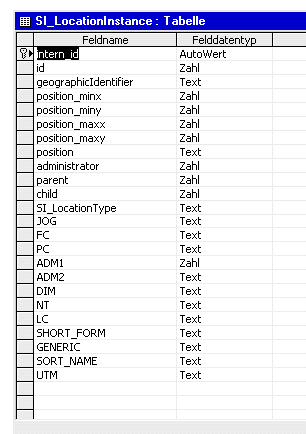
For the geometry-column, the field "position" is used. As in the concrete case only points are stored, the declaration as "text" is adequate (in other cases "memo" should be used). Four columns are assigned which store the BoundingBox of the corresponding geometries.
In order for the WFS to identify the fields, that contain the GML-geometries and therefore are to interpreted as geometry-fields, they must be declared in the configuration-file of the Datastore. For this purpose, each table represented by an element (<MasterTable>, <RelatedTable>) has additional elements, which specify the fields to be interpreted as geometries.
...
<FeatureType name="BKG_VG250">
   <!-- name of the top level table if a relational schema is used. otherwise this
             is the only table. -->
   <MasterTable name="BKG_VG250" targetName="BKG_VG250">
      <!-- name of the table column that stores the id of a feature -->
      <IdColumn number="true" auto="true">MI_PRINX</IdColumn>
      <Reference tableField="administrator" replaceable="true"
              targetTable="BKG_VG250_RP" targetField="ID"/>
      <Reference tableField="location_type" replaceable="true"
              targetTable="BKG_VG250_LT" targetField="IDENTIFIER"/>
      <!-- name of a column(s) that contains geodata (GML) -->
      <GeoFieldIdentifier>BKG_VG250.position</GeoFieldIdentifier>
   </MasterTable>
   <RelatedTable name="BKG_VG250_RP" jointable="false"/>
   <RelatedTable name="BKG_VG250_LT" jointable="false">
      <!-- name of a column(s) that contains geodata (GML) -->
      <GeoFieldIdentifier>BKG_VG250.TERRITORYOFUSE</GeoFieldIdentifier>
   </RelatedTable>
</FeatureType>
...
Beyond this, the specifications for configuration, as described in the OracleDatastore, apply. Only for the specification of the output-formats, the corresponding classes change.
...
<OutputFormat>
   <GML2
responsibleClass="org.deegree_impl.services.wfs.gml.GMLDBDataStoreOutputGML">
<SchemaLocation>file:///$deegreewfs_home/xml/bkg_250.xsd</SchemaLocation>
   </GML2>
   <XML
responsibleClass="org.deegree_impl.services.wfs.gml.GMLDBDataStoreOutputXML">
    <Param name="FILTER"
    value="file:///$deegreewfs_home/xml/transform.xsl"/>
       <SchemaLocation>file:///$deegreewfs_home/xml/ bkg_250x.xsd</SchemaLocation>
   </XML>
   <FEATURECOLLECTION
responsibleClass="org.deegree_impl.services.wfs.gml.GMLDBDataStoreOutputFC"/>
  </OutputFormat>
...
For accessing MySQL spatial (MySQL Version 4.1.1 or higher) deegree sources countain a new datastore. The configuration of this datastore is different as desribed before, because MySQL requires the usage of a database function to deliver geometries in a readable format.
To connect a MySQL-Database use the following description.
...
<Connection>
   <driver>org.gjt.mm.mysql.Driver</driver>
   <logon>jdbc:mysql://10.133.5.99:5432/deegree</logon>
   <user>aUser</user>
   <password>aPassword</password>
</Connection>
...
The format specifications are similar as described before, but other classes are referenced (see below). The major difference when using MySQL-Databases is that the definition of mapping between database-field-names and property-names is absolutly necessary. Also the definition of an alias name for the geometry-field is required.
...
<FeatureType name="bundeslaender">
  <OutputFormat>
    <GML2
    responsibleClass="org.deegree_impl.services.wfs.mysql.MySQLDataStoreOutputGML">
    <SchemaLocation>
         file:///$deegreewfs_home/xml/rivers.xsd
    </SchemaLocation>
    </GML2>
    <FEATURECOLLECTION
     responsibleClass="org.deegree_impl.services.wfs.mysql.MySQLDataStoreOutputFC"/>
  </OutputFormat>

  <MappingField>
        <Property name="GEOM" type="GEOMETRY"/>
        <DatastoreField name="AsTEXT(geom)" alias="GEOM" type="GEOMETRY"/>
  </MappingField>
  <MappingField>
        <Property name="Country/Name" type="VARCHAR"/>
        <DatastoreField name="CNTRY_NAME" type="VARCHAR"/>
  </MappingField>
  <MasterTable name="bundeslaender" targetName="bundeslaender">
        <IdField number="false" auto="false">CNTRY_NAME</IdField>
        <GeoFieldIdentifier>GEOM</GeoFieldIdentifier>
  </MasterTable>
  <CRS>EPSG:4326</CRS>
</FeatureType>
...
Notice the mapping of the geometry field. The datastore field name is build from a function (AsTEXT) and the name of the table field (GEOM) that is passed to it. Also a alias (GEOM) is defined where the result of the function is mapped to.
We had some tests on the MySQL database and the datastore and found two problems:
We couldn't insert realy large geometries into the database (e.g. borders of russia with a very high percision of coordinates). There seems to be maximum limit for insert statements or geometry size.
We can insert MultiPolygon or MultiLinestrings with a high number of elements but we can't access them from the database. E.g. Ireland or Denmark are countries with a lot of islands and so they are building MultiPolygons with a lot of elements.
We used MySQL 4.1.1 for windows and mysql-connector-java-3.0.8-stable-bin.jar JDBC-driver.
The configuration file formats describing the access to ESRI shapefiles differ from the database connection in some points. For instance, shapefiles are not accessed via JDBC, but rather through an access class natively integrated into deegree. Consequently, the corresponding block for configuring the JDBC driver is missing in the configuration files.
The description of the output format remains the same, only the responsible classes is adjusted.
...
<OutputFormat>
   <GML2
      responsibleClass="org.deegree_impl.services.wfs.shape.SHPDataStoreOutputGML">
      <SchemaLocation>file:///$deegreewfs_home/xml/rivers.xsd</SchemaLocation>
   </GML2>
   <XML
      responsibleClass="org.deegree_impl.services.wfs.shape.SHPDataStoreOutputXML">
      <SchemaLocation>file:///$deegreewfs_home/xml/rivers.xsd</SchemaLocation>
   </XML>
   <FEATURECOLLECTION
      responsibleClass="org.deegree_impl.services.wfs.shape.SHPDataStoreOutputFC">
      <SchemaLocation>file:///$deegreewfs_home/xml/rivers.xsd</SchemaLocation>
   </FEATURECOLLECTION>
  </OutputFormat>
...
With the current version of deegree WFS it is not possible to relationally connect a shapefile or its corresponding DBase table with other tables to represent more complex schemes. Therefore the paragraph dealing with the description of the FeatureType schemas only contains the name of the main table and the names of the rows of the DBase table. These should be interpreted as IDs.
...
<MappingField>
      <Property name="/Rivers/ID" type="DOUBLE"></Property>
      <DatastoreField name="ID" type="DOUBLE"></DatastoreField>
</MappingField>
<MappingField>
      <Property name="/Rivers/Name" type="VARCHAR"></Property>
      <DatastoreField name="ID" type="VARCHAR"></DatastoreField>
</MappingField>
<MappingField>
      <Property name="/Rivers/Geometry" type="GEOMETRY"></Property>
      <DatastoreField name="GEOM" type="GEOMETRY"></DatastoreField>
</MappingField>
<MasterTable name="file:///$deegreewfs_home/data/mjrivers"
           targetName="Rivers">
      <IdField number="false" auto="false">ID</IdField>
      <GeoFieldIdentifier>GEOM</GeoFieldIdentifier>
</MasterTable>
<CRS>EPSG:4326</CRS>
...
The root node of the shapefile is given with the attribute name of the element <Mastertable>. Thus, a file extension is not given. In the case of shapefiles the name of the GeoFieldIdentifier always is 'GEOM'.